# Mount disk image (raw)

![](https://3977837039-files.gitbook.io/~/files/v0/b/gitbook-x-prod.appspot.com/o/spaces%2F-MfT0VPyK6X13Egd9pzy%2Fuploads%2FdVyhP9bhImrxsEwdbtFw%2Fimg_mount-1-678x381.png?alt=media\&token=3dce7239-bd77-4a4d-9a78-4d8ad1270ba8)

### 1. Introduction

> Image mounting involves mounting the evidence disk image on the local system so the data on the disk can be analyzed and inspected.

In this lab, an evidence hard disk image is present on an external disk mounted on ‘/dev/sdc’. The [**dd tools**](https://en.wikipedia.org/wiki/Dd_\(Unix\)) are installed on the lab machine. Also, a flag file is kept in the /root directory of the disk image filesystem.

Mount the evidence disk image and retrieve the flag!

### 2. mount raw disk part 1

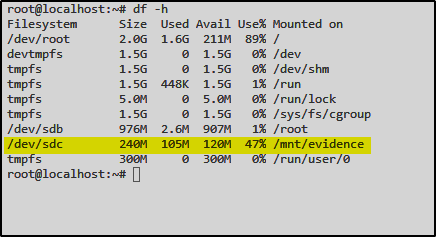
First let’s check if /dev/sdc is mounted

![](https://3977837039-files.gitbook.io/~/files/v0/b/gitbook-x-prod.appspot.com/o/spaces%2F-MfT0VPyK6X13Egd9pzy%2Fuploads%2FYwZUZXEP35WkHIQmfLnI%2Fimg_mount1.png?alt=media\&token=98250fc9-8a55-4750-a954-61c01ad0cef1)

I’ll browse to /mnt/evidence

![](https://3977837039-files.gitbook.io/~/files/v0/b/gitbook-x-prod.appspot.com/o/spaces%2F-MfT0VPyK6X13Egd9pzy%2Fuploads%2Fkpkd03FhckKoOXTys38B%2Fimg_mount2.png?alt=media\&token=c6e79000-9eb0-44d7-b7a5-50ba58687d1d)

From there I’ll copy the evidence.img file to the root directory

`cp evidence.img /root`

`file evidence.img`

<div align="left"><img src="https://3977837039-files.gitbook.io/~/files/v0/b/gitbook-x-prod.appspot.com/o/spaces%2F-MfT0VPyK6X13Egd9pzy%2Fuploads%2F8fE2ETuehLiwSKlJS8gb%2Fimg_mount3.png?alt=media&#x26;token=e97e672e-71e3-4958-97a2-a446f11706eb" alt=""></div>

From here we’ll create a directory called «analysis»

`mkdir analysis`

`mount evidence.img /analysis`

`df -h`

![](https://3977837039-files.gitbook.io/~/files/v0/b/gitbook-x-prod.appspot.com/o/spaces%2F-MfT0VPyK6X13Egd9pzy%2Fuploads%2Fy1fMPnD3R79KLut9qjoT%2Fimg_mount4.png?alt=media\&token=cbafa7cb-ebd8-44d8-bd70-7dd317388ba7)

### 3. Grab flag 1

`cd /analysis/root`

`cat flag.txt`

![](https://3977837039-files.gitbook.io/~/files/v0/b/gitbook-x-prod.appspot.com/o/spaces%2F-MfT0VPyK6X13Egd9pzy%2Fuploads%2FJU1jLAe4Xo0dELoS0FwY%2Fimg_mount5.png?alt=media\&token=65e0903b-ddf7-4bbe-bdc0-81a97f5012fc)

### 4. mount raw disk part 2

First let’s check if /dev/sdc is mounted

<div align="left"><img src="https://3977837039-files.gitbook.io/~/files/v0/b/gitbook-x-prod.appspot.com/o/spaces%2F-MfT0VPyK6X13Egd9pzy%2Fuploads%2F3ei5K7MB2xKnvv9lKmQ3%2Fimg_mount06.png?alt=media&#x26;token=76359586-3b1a-4d22-a128-13dc12e2f122" alt=""></div>

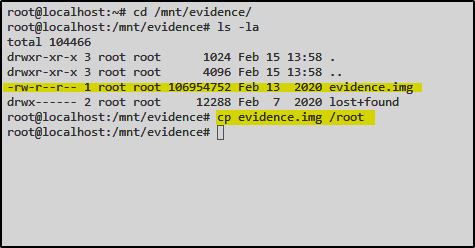
I’ll browse to /mnt/evidence

From there I’ll copy the evidence.img file to the root directory

`cp evidence.img /root`

<div align="left"><img src="https://3977837039-files.gitbook.io/~/files/v0/b/gitbook-x-prod.appspot.com/o/spaces%2F-MfT0VPyK6X13Egd9pzy%2Fuploads%2F1ONAxzC9K9g6IPh0j49u%2Fimg_mount07.png?alt=media&#x26;token=d5b8aa59-02e9-4714-ae07-906a2eb2b066" alt=""></div>

From here we’ll create a directory called «evidence2»

`mkdir evidence2`

`mount evidence.img /analysis`

<div align="left"><img src="https://3977837039-files.gitbook.io/~/files/v0/b/gitbook-x-prod.appspot.com/o/spaces%2F-MfT0VPyK6X13Egd9pzy%2Fuploads%2FJsO0iYd1hQoDCvUPRZ4x%2Fimg_mount08.png?alt=media&#x26;token=49d68f07-4e75-4c6d-8bcf-d5188f8d2acd" alt=""></div>

This time we get an error back and coun't mount the img file.

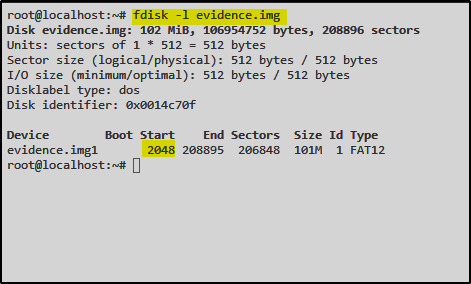
With help of  fdisk we can read out the start sector&#x20;

`fdisk -l evidence.img`

<div align="left"><img src="https://3977837039-files.gitbook.io/~/files/v0/b/gitbook-x-prod.appspot.com/o/spaces%2F-MfT0VPyK6X13Egd9pzy%2Fuploads%2FoNuSKGgxlvl9akycqm5L%2Fimg_mount09.png?alt=media&#x26;token=580b3071-00a9-4703-af1f-664faa9c5b53" alt=""></div>

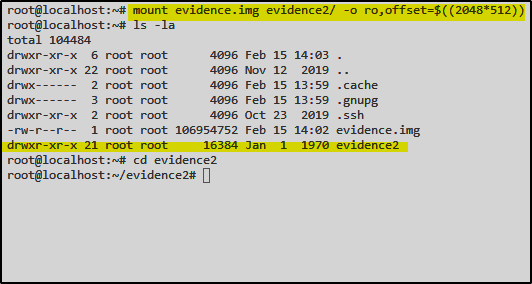
We try to remount the image with the following command:

`mount evidence.img evidence2/ -o ro,offset=$((2048*512))`

<div align="left"><img src="https://3977837039-files.gitbook.io/~/files/v0/b/gitbook-x-prod.appspot.com/o/spaces%2F-MfT0VPyK6X13Egd9pzy%2Fuploads%2FPhrKIuhKdjiDxpBtNSXS%2Fimg_mount10.png?alt=media&#x26;token=1f52e9c3-89d2-420f-b561-4a702ca4138c" alt=""></div>

### 5. Grab flag 2

<div align="left"><img src="https://3977837039-files.gitbook.io/~/files/v0/b/gitbook-x-prod.appspot.com/o/spaces%2F-MfT0VPyK6X13Egd9pzy%2Fuploads%2FdOJEe0ZkCiIFeGRBCYNJ%2Fimg_mount11.png?alt=media&#x26;token=69a9ef6c-85b5-4a15-b599-e5d72cd42b3b" alt=""></div>

### 6. Summary

{% embed url="<https://vimeo.com/677725908>" %}