> For the complete documentation index, see [llms.txt](https://cas-cyber.gitbook.io/cas-cybersecurity/llms.txt). Markdown versions of documentation pages are available by appending `.md` to page URLs; this page is available as [Markdown](https://cas-cyber.gitbook.io/cas-cybersecurity/docker-basics/bwapp.md).

# bWAPP

### bWAPP installation (buggy Web APPlication)

> sudo docker pull raesene/bwapp

<div align="left"><img src="https://3977837039-files.gitbook.io/~/files/v0/b/gitbook-legacy-files/o/assets%2F-MfT0VPyK6X13Egd9pzy%2F-MhTILpbojrkk7ZLLd-W%2F-MhTK3CCYCyuZII8Awhv%2Fwebgoat01.png?alt=media&amp;token=1cda8666-e51c-49cd-b218-e8e4c9b53011" alt=""></div>

Create the container and start the app

> sudo docker pull raesene/bwapp\
> sudo docker create --name bwapp -p 8080:80 -it raesene/bwapp\
> sudo docker start bwapp

Navigate to <http://127.0.0.1:8080/install.php>

<div align="left"><img src="https://3977837039-files.gitbook.io/~/files/v0/b/gitbook-legacy-files/o/assets%2F-MfT0VPyK6X13Egd9pzy%2F-MhTILpbojrkk7ZLLd-W%2F-MhTN9jj0kwbWUBK_24G%2Fbwapp02.png?alt=media&amp;token=6b1ca593-2400-4fce-95ab-c68b96070a31" alt=""></div>

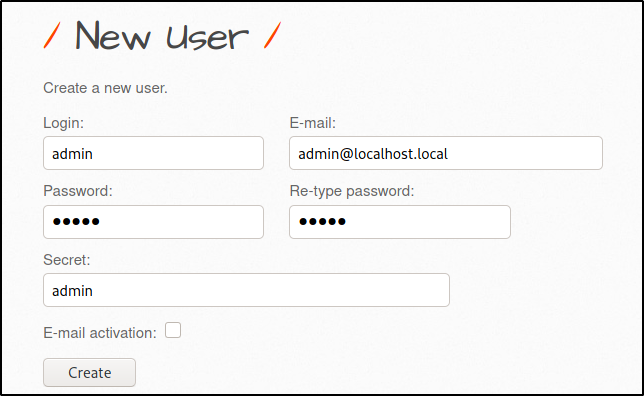
Create a new user admin/admin

<div align="left"><img src="https://3977837039-files.gitbook.io/~/files/v0/b/gitbook-legacy-files/o/assets%2F-MfT0VPyK6X13Egd9pzy%2F-MhTILpbojrkk7ZLLd-W%2F-MhTNpZzw5mmsznSEnB1%2Fbwapp03.png?alt=media&amp;token=1dcc3582-53e9-47ae-93d8-af83cf09cf51" alt=""></div>

bwapp is ready :)